
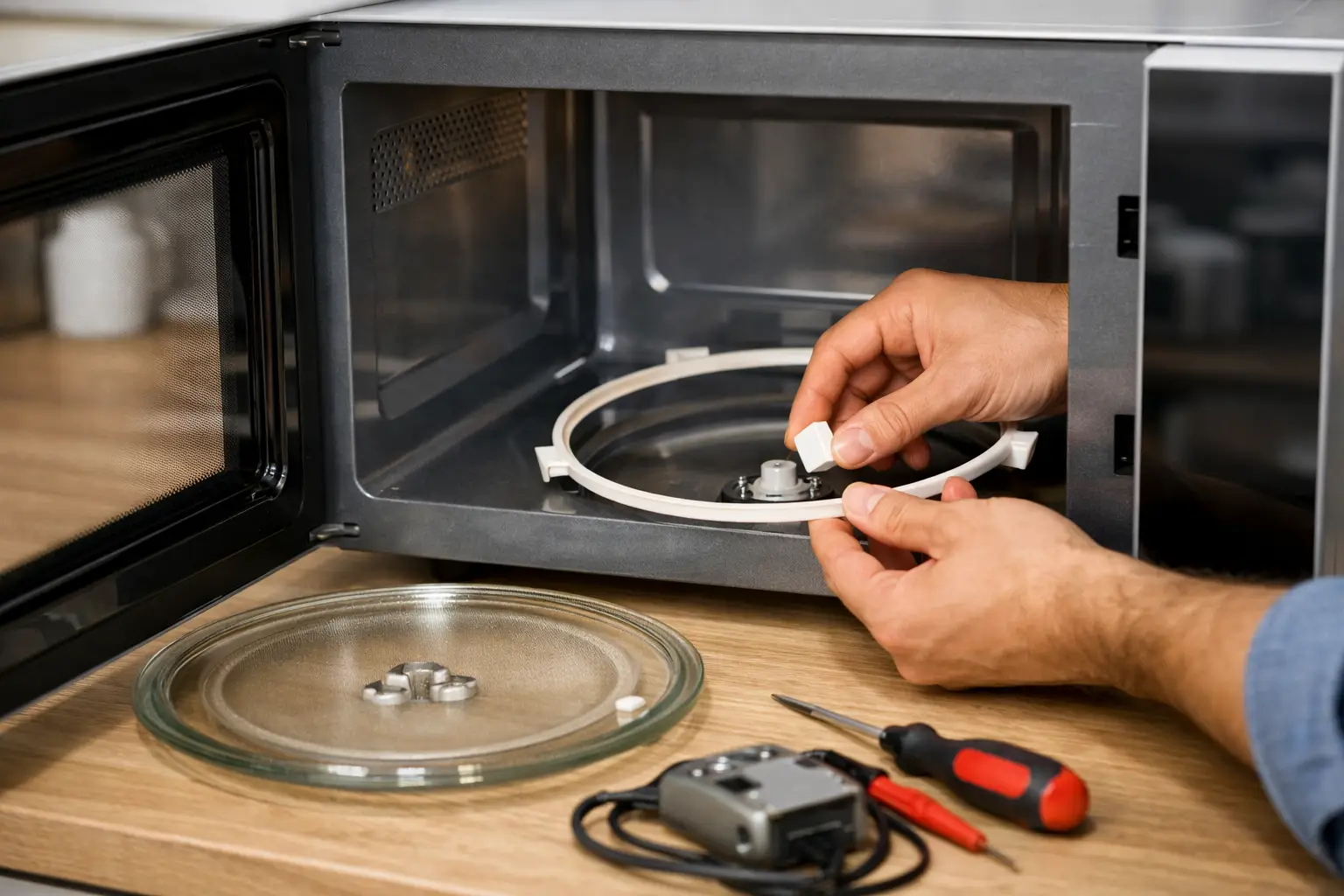
A microwave can still appear to work when the glass tray stops moving: the light comes on, the display counts down, and food may even heat. But unevenly heated leftovers and cold spots are usually close behind. Microwave turntable not spinning repair starts with identifying whether the tray is simply out of position or whether a component beneath it has failed.
For busy households, this is more than a minor inconvenience. A turntable that does not rotate can make reheating less reliable and may point to a worn drive part that needs attention before it creates a larger service issue.
Start With the Parts You Can Safely Check
Before assuming the microwave needs a repair, unplug it and let it cool if it has just been used. Remove the glass tray, then look at the roller guide or ring underneath. Food residue, a misplaced roller, or a cracked guide can keep the tray from sitting level and turning freely.
Clean the microwave floor, roller guide, and underside of the glass tray with a soft cloth. Dried spills can create enough resistance to stop rotation. Once the parts are clean, place the roller guide back in its track and set the tray on the center drive coupler. The tray should sit flat and turn easily by hand.
Also check the tray itself for cracks or warping. A damaged tray may wobble, catch on the cavity wall, or fail to engage correctly with the center coupler. Replacing a tray or roller guide can be a straightforward solution when those parts are visibly damaged.
Do not run the microwave without its proper tray assembly unless the manufacturer specifically says that model is designed for it. Some microwave ovens use a flatbed cooking system, but conventional turntable models rely on the rotating tray for more even heating.
Why a Microwave Turntable Stops Spinning
If cleaning and reseating the tray do not correct the problem, the issue is often below the microwave floor. Several components work together to rotate the tray, and a trained diagnosis helps avoid replacing the wrong part.
Worn or broken drive coupler
The drive coupler is the small center piece that connects the turntable motor to the glass tray. Its grooves can wear down, crack, or become stripped over time. When that happens, the motor may run but cannot grip the tray well enough to rotate it.
A damaged coupler is commonly visible once the tray is removed. Still, a coupler that looks intact can have internal wear, so appearance alone does not always confirm the diagnosis.
Failed turntable motor
The turntable motor is mounted under the microwave cavity. It receives power during cooking and turns the coupler at a slow, steady speed. A failed motor may stop completely, rotate only intermittently, or make a humming or grinding sound without moving the tray.
Motor replacement requires accessing components behind the microwave’s lower panel or cabinet area. For an over-the-range microwave, the unit may need to be safely supported or removed from its mounting position. This is usually a job for an appliance technician rather than a homeowner repair.
Damaged roller guide or support wheels
The roller guide supports the weight of the tray as it turns. Its small wheels can seize, break, or wear unevenly. If the guide is not centered or a wheel is missing, the tray may drag along the microwave floor instead of rotating smoothly.
This failure can look like a motor problem at first. A technician will check the roller guide, coupler, tray fit, and motor operation before recommending a replacement part.
Control or wiring issue
Less commonly, the motor itself is functional but is not receiving the correct power. A faulty control board, loose wiring connection, or damaged switch can interrupt turntable operation. These faults require electrical testing and should not be investigated by removing the microwave cabinet at home.
Microwaves contain high-voltage components that can retain a dangerous electrical charge even after the appliance has been unplugged. Never remove the outer cabinet to test wiring, capacitors, or internal switches.
Is It Safe to Use a Microwave With a Stuck Turntable?
It depends on the microwave model and the food being heated. In many conventional microwaves, the oven will still operate when the tray is not spinning, but food may heat unevenly. That creates a practical concern with leftovers, frozen meals, and foods that need to reach a consistent internal temperature.
You may be tempted to pause the cycle and turn the dish by hand. This can improve heating in a pinch, but it is not a dependable long-term solution. It is easy to forget, and a tray that is binding can put added strain on the coupler or motor.
Stop using the microwave and arrange service if you notice sparking, burning smells, loud grinding, a damaged interior floor, or any loss of heating performance. A turntable problem by itself may be a contained mechanical repair, but these additional symptoms can indicate a separate issue that needs prompt professional attention.
What to Expect From Professional Turntable Repair
A proper microwave diagnosis begins with the simple causes. The technician checks the tray, roller guide, and drive coupler for fit and wear, then verifies whether the turntable motor is operating as it should. If the problem is electrical, the technician can test the relevant connections and controls using appropriate procedures.
The recommended repair should be clear: which part has failed, whether the part is available, and what the total repair will cost before work begins. For many homeowners, replacing a roller guide, coupler, or turntable motor is worthwhile when the microwave otherwise heats correctly and remains in good condition.
However, the best choice depends on the appliance’s age, installation type, overall condition, and the cost of the needed part. An older over-the-range microwave with multiple concerns may not be the best candidate for a major repair. An honest assessment should account for the full appliance condition, not just the stalled tray.
IAS Appliance Solutions provides microwave diagnostics and repair for homeowners in Frisco, Plano, McKinney, Allen, and nearby North Texas communities. Experienced technicians can identify the source of the problem, explain the repair options plainly, and help minimize disruption to your kitchen routine.
Help Your Replacement Parts Last Longer
A few habits can reduce unnecessary wear after the repair. Keep the microwave floor and roller guide clean, especially after spills. Place dishes centered on the tray rather than pushing them against one side. Use cookware that fits without rubbing the cavity walls, and avoid placing excessive weight on the glass tray.
When cleaning, make sure the roller guide is returned to its correct position before replacing the tray. If the tray begins wobbling again, address it early rather than forcing it to turn through resistance.
A microwave should make weekday meals easier, not turn a two-minute reheat into a guessing game. If the tray still will not rotate after the basic checks, a professional diagnosis can provide a safe, practical path back to even heating and a functioning kitchen.


[…] damaged roller ring, turntable support, or turntable can also cause a dish to sit unevenly and touch an interior surface. If sparking occurs only while […]